I realized I have not made an announcement of one of my side projects. MalmCrop2!
You may recognize its content as being mostly the DaVinci templates I used to call MalmScope. But Now it has been renamed MalmCrop2
Why the namechange?
Quite simply. It became too annoying to try to discern MalmScope the .drfx package and MalmScope the fusion template. And MalmBox was already taken. So to give them all distinct names, I settled on calling the .drfx package MalmCrop.
Apart from the namechange, what has changed?
Quite a bit actually. All three templates in the .drfx package have been rewritten from basically scratch. And with that, a lot of simplifications have been done for the templates for the sake of te user.
What changed in MalmBox2?
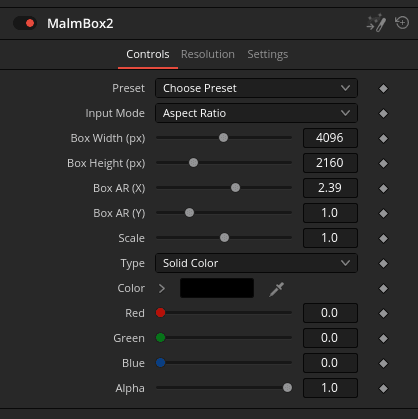
This one has now gotten two modes. One for making an arbitrary window box using pixels (classic mode) and a simple Aspect Ratio mode where you enter in an aspect ratio and it makes a letterbox of that shape.
What changed in MalmFilm2?
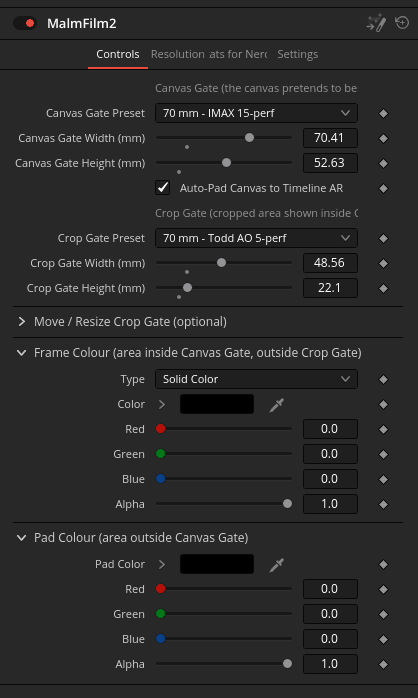
This one, which used to carry the awkward name “MalmBoxFilmSize” now got renamed MalmFilm2 for simplicity. And while you still enter into it gate-sizes in millimeters. It has been rewritten to be much more intuitive and less visually busy. For basic operation, you simply enter in the Canvas Gate Width and Height. That tells the template how big to consider your timeline. And then you enter in the Crop Gate Width and Height. And that makes a windowbox inside the Canvas Gate that is correctly sized in relation to it.
You can, for example enter into it a size like 15 perf IMAX at 70.41 mm * 52.63 mm. That tells the template that the timeline resolution corresponds to IMAX size. Then you enter into it something like Academy 35 mm at 20.96 mm * 15.29. mm and the template will make a windowbox that is how big it would be to have an Academy 35 frame inside an IMAX frame.
What changed in MalmScope2?
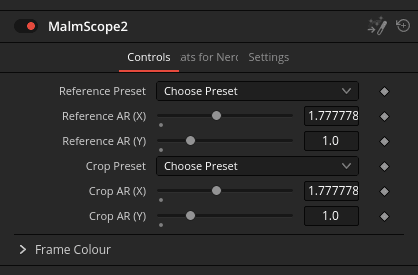
This one also got a lot more simplified. But you still give it the Reference Aspect Ratio and then a Crop Aspect Ratio. And with that you get a properly sized windowbox that has the same pixel resolution as the Reference Aspect Ratio. Use this one for times where you want to have a variable aspect ratio but you don’t want IMAX to be bigger or smaller in presented pixels than CinemaScope, for example.
Ok, but I see also in the screenshots something about presets?
Why yes. Each one now also has a big list of film formats as presets to simplify setting things up. I think there’s more than 40 of the presets right now. From normal ones like 4 perf super35, 70 mm AO and such and down to a whole bunch of esoteric niche ones like AstroVision or CinemaScope 55. All these have gate sizes and from that the Aspect Ratio is derived for the templates that need that.
I think the preset list is excessive and some are simply wrong!
If you don’t like my selection you can go ahead and pull down a copy of the repo, edit the .tsv file named filmformats and rebake it. That produces a fresh .drfx that has only the presets you want in the list.
Have fun!
So where do I get it?
As of this writing, the latest MalmCrop is MalmCrop2 and is available on my Codeberg Repo at:
https://codeberg.org/jmalmsten-com/malmcrop
Now have fun and waste time noodling around with windowboxes. I sure have wasted enough time on them myself!
/ Be seeing you!